
Key takeaways
We checked 18 firms per product and per stage, not once per brand. Nine confirm TradingView at every stage up to the first payout: FTMO 2-Step, FXIFY Two Phase Classic, Purdia 50K EOD, Darwinex Zero, FundedNext Futures Flex, BluSky Propel, Tradeify Select, TradeDay Fast Pass and Apex Trader Funding 50K EOD. The last five also carry a live call-up you cannot decline, named first in their watch-out; a call-up is a warning here, not a reason to drop a firm from the list.

Freshness: checked September 30, 2026. Re-check before you buy.
Editorial disclosure. BestProps has no affiliate or sponsor relationship with any firm in this post (FTMO, FXIFY, Purdia Capital, Darwinex Zero, TradeDay, Tradeify, MyFundedFutures, Apex Trader Funding, Take Profit Trader, Lucid Trading, Earn2Trade, Alpha Futures, BluSky, ThinkCapital, FundedNext Futures, Topstep, The5ers or AquaFunded), and has received no money from any of them. This post quotes list prices, not promo codes. No firm paid for placement or reviewed this post. Full policy: affiliate disclosure.
Quick picks for prop firms that use TradingView
- Forex/CFD: FTMO 2-Step, €345. TradingView login through OANDA at every stage.
- Futures: Purdia 50K EOD, $179 a month. TradingView login through Tradovate, rule-based live move.
- US forex: FTMO US 2-Step, $399. TradingView login through OANDA; MT5 is the only other option.
- Charts only: Topstep. TradingView charts inside TopstepX, no TradingView login.
Why a brand-level “yes” misleads: Topstep, the SERP’s most-named TradingView futures firm, says TopstepX “Cannot connect to external platforms like TradingView”. FTMO added TradingView trading through OANDA with the FTMO login on August 26, 2026. Alpha Futures lost TradingView on July 12, 2026 and got it back through Plus500US on September 4, 2026.
What counts as a prop firm that uses TradingView
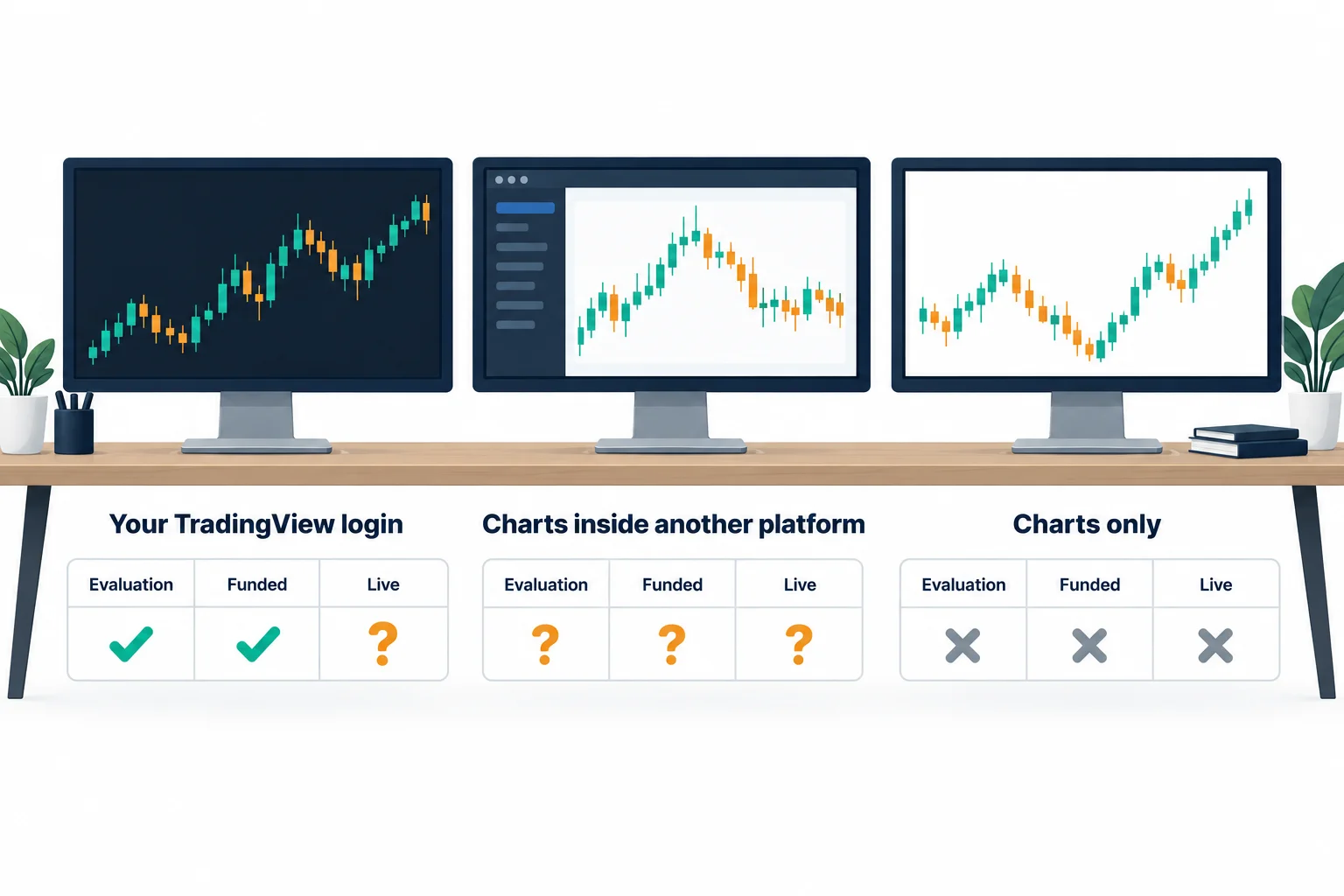
TradingView itself is a charting platform, not a broker: it holds no funds and places no trades on its own. You pick a connected broker inside TradingView’s Trading Panel, log in with credentials issued by that broker (here, the prop firm or its partner broker), and TradingView passes your order to that account. The chart, the drawing tools, the alerts and any Pine Script indicators are TradingView’s; the execution, the fill and the account balance belong to the broker on the other side of that login. That distinction is why “TradingView” on a firm’s homepage can mean three very different experiences.
- TradingView login: you log in to a broker inside your own TradingView account. Example: FTMO through OANDA.
- Charts inside another platform: TradingView-powered charts in the firm’s platform. Example: Topstep’s TopstepX.
- Bridge or webhook: alerts sent to another platform by a third-party connector. No firm here documents one as its route.
- Analysis only: you chart in TradingView and trade elsewhere. Example: Take Profit Trader’s Rithmic accounts.
For TradingView itself, see our TradingView page.
Prop firms that use TradingView compared in two tables
Table A, where TradingView works, stage by stage
| #, firm, product (market) | Broker in TradingView | Evaluation | Funded (sim) | Live or after call-up | SKUs or countries without TradingView | Tier |
|---|---|---|---|---|---|---|
| 1. FTMO 2-Step (forex/CFD) | OANDA, FTMO login | TradingView login | TradingView login | No live stage | None among CFD Challenges; US buys FTMO US | Ranked |
| 2. FXIFY Two Phase Classic (forex/CFD) | Alchemy Markets | TradingView login | TradingView login | No live stage | Lightning (MT5); Instant Funding pages conflict | Ranked |
| 3. Purdia Capital 50K EOD Evaluation (futures) | Tradovate | TradingView login | TradingView login (generic wording) | Live Tradovate account (generic wording) | None found | Ranked |
| 4. Darwinex Zero subscription (forex/CFD) | Darwinex | TradingView login (calibration) | Same account | No call-up | Futures, stocks, crypto (MT5); old MT4/MT5 accounts | Ranked |
| 5. FundedNext Futures Flex 50K (futures) | Tradovate (Demo) | TradingView login | TradingView login | Not published (call-up) | None; FundedNext CFD is charts only | Ranked |
| 6. TradeDay Fast Pass 50K (futures) | Tradovate (TD_ login) | TradingView login | TradingView login | Not published (call-up) | Rithmic accounts | Ranked |
| 7. Apex Trader Funding 50K EOD (futures) | Tradovate | TradingView login | TradingView login | Not published (call-up) | Rithmic, WealthCharts | Ranked |
| 8. Tradeify Select 50K (futures) | Tradovate | TradingView login | TradingView login | Not published (call-up) | Rithmic, Tradesea, WealthCharts | Ranked |
| 9. BluSky Propel 50K (futures) | Tradovate | TradingView login | TradingView login | Not published (call-up) | Volumetrica, Rithmic, Tradesea, Tickblaze | Ranked |
| MyFundedFutures Rapid 50K (futures) | Tradovate | TradingView login | TradingView login | Not published | None identified | Cautionary |
| Take Profit Trader 50K Test (futures) | Tradovate (CQG) | TradingView login | TradingView login (PRO) | Not published (PRO+) | Rithmic feed | Cautionary |
| Lucid Trading LucidFlex 50K (futures) | CQG, broker not named | TradingView login | Not published | Not published | Rithmic platforms | Cautionary |
| Earn2Trade TCP50 (futures) | Tradovate | TradingView login | Not published | Not published | Rithmic, BlackArrow feeds | Cautionary |
| Alpha Futures Standard 50K (futures) | Plus500US, AlphaTrader login | TradingView login | TradingView login | Not published | Accounts bought on other platforms | Cautionary |
| ThinkCapital Dual Step Intraday 50K (forex/CFD) | ThinkMarkets | TradingView login | TradingView login | No live stage | None (ThinkTrader only) | Cautionary |
| Topstep 50K Combine (futures) | None | Charts inside TopstepX | Charts inside TopstepX | Not published | All Topstep accounts | Charts only |
| The5ers High Stakes (forex/CFD) | None (own terminal) | Charts inside web terminal | Charts inside web terminal | No live stage | Futures; US is web terminal only | Charts only |
| AquaFunded 2 Step Standard (forex/CFD) | None | Charts inside TradeLocker or MatchTrader | Charts inside TradeLocker or MatchTrader | No live stage | MT5, cTrader | Charts only |
Table B, what it costs and what can end it
| Firm | 50K list price (billing) | TradingView cost on top | Funded drawdown | Main watch-out | Trustpilot | Firm’s connection guide |
|---|---|---|---|---|---|---|
| 1. FTMO | €345 one-time | No firm fee; free plan not stated | $5,000 static | Per-device link | 4.8 (53,443) | guide |
| 2. FXIFY | $379 one-time | No firm fee; free plan not stated | $5,000 static | Latency arbitrage exits | 4.3 (6,334) | guide |
| 3. Purdia Capital | $179/month + $130 activation | Add-on “no additional cost”; free plan works | $2,000 EOD trailing (SFA) | SFA excess forfeited | 3.8 (88) | guide |
| 4. Darwinex Zero | $50/month subscription | Free plan works, slower updates | None | ToB 5.3 | 4.2 (386) | guide |
| 5. FundedNext Futures | $133.99 one-time | None published; live data via Tradovate | $1,500 EOD trailing | Live call-up | 4.5 (80,482, brand-wide) | guide |
| 6. TradeDay | $189/month | Own licence; $156/month per exchange at Live | $2,000 EOD trailing | Live call-up | 4.6 (1,440) | guide |
| 7. Apex Trader Funding | $590 one-time + $129 activation | Free add-on renewed monthly, 5 s updates | $2,000 EOD trailing | Live call-up | 4.2 (21,163) | guide |
| 8. Tradeify | $165 one-time | Free add-on; free plan 5 s updates | $2,000 EOD trailing | Live call-up | 4.4 (4,906) | guide |
| 9. BluSky | $160 per 30 days | None published; $156/month at live | Static ($2,900 floor) | Live call-up | 4.7 (898) | video |
| MyFundedFutures | $209 one-time | None published; live costs from balance | $2,000 intraday trailing | Intraday trailing floor | 4.9 (22,104) | guide |
| Take Profit Trader | $170/month + $130 PRO fee | Free Basic plan, delayed; PRO+ data not published | $2,000 intraday trailing (PRO) | Intraday trailing floor | 4.4 (10,742) | guide |
| Lucid Trading | $146 one-time | Not published | $2,000 EOD trailing | TradingView unconfirmed when funded | 4.3 (6,046) | Not published |
| Earn2Trade | $190/month | No cost in evaluation; Live $140 to $156/month | $2,000 EOD trailing | Daily loss ends account | 4.6 (5,011) | guide |
| Alpha Futures | $129/month | None published; Non-Professional Agreement | $2,000 EOD trailing | Open payout queue; route changes | 4.4 (6,048) | guide |
| ThinkCapital | $299 one-time | No firm fee; free plan not stated | 8% static | Pakistan payout cancellation | Hidden (611) | guide |
| Topstep | $95/month, or $49/month + $149 | None (no TradingView account used) | $2,000 EOD trailing | Live call-up | 3.6 (14,878) | None (cannot connect) |
| The5ers | $249 one-time | None (no TradingView account used) | 8% static (FAQ says 10%) | Own pages disagree on floor | 4.7 (38,804) | Not published in English |
| AquaFunded | $239 one-time | None (no TradingView account used) | 8% static | Wave Stop | Hidden (1,198) | TradeLocker guide |
Futures and forex prices are not like-for-like, and Darwinex Zero is a subscription. See cheapest futures prop firms.
Futures prop firms that use TradingView through Tradovate or CQG
Futures firms reach TradingView through Tradovate (or CQG) inside TradingView’s Trading Panel. The rule that bites is the platform you buy: Rithmic, WealthCharts, Volumetrica and similar options get no TradingView at Tradeify, Apex, TradeDay, BluSky, Take Profit Trader and Earn2Trade. Alpha Futures now uses Plus500US instead of Tradovate.
Platform background: Tradovate and all trading platforms.
Forex prop firms that use TradingView through a broker login
Forex and CFD firms connect through a named broker in TradingView: FTMO through OANDA, FXIFY through Alchemy Markets, ThinkCapital through ThinkMarkets and Darwinex Zero through Darwinex. US traders get fewer choices. More on US access in forex prop firms for US traders.
Funded and live stages at prop firms with TradingView
Most firms confirm TradingView for the evaluation, fewer for funded, almost none for live. Forex firms here have no live stage. Futures firms often move funded traders to a live brokerage account, and no cautionary futures firm names TradingView on its live account.
We grade a live call-up you cannot decline as a warning in the watch-out, not as a reason to drop a firm, the same standard as our most trusted prop firms guide. Six futures firms rank on the strength of their TradingView route alone, call-up or not; the firms below stay cautionary for a different, confirmed problem.
Platform choice never outranks a harder drawdown rule. A trader who picks MyFundedFutures for its 24-hour-after-first-trade sim payout can still fail faster than at a slower-paying static-floor firm, because the Sim Funded floor trails intraday unrealized gains, not just closed trades. The same logic applies to Take Profit Trader’s PRO floor and Apex’s EOD Trail: TradingView access is identical at all three, but the rule under it is not, so check the drawdown type before the payout speed.
Broader platform changes are tracked in platform watch.
Ranked prop firms that use TradingView at every stage
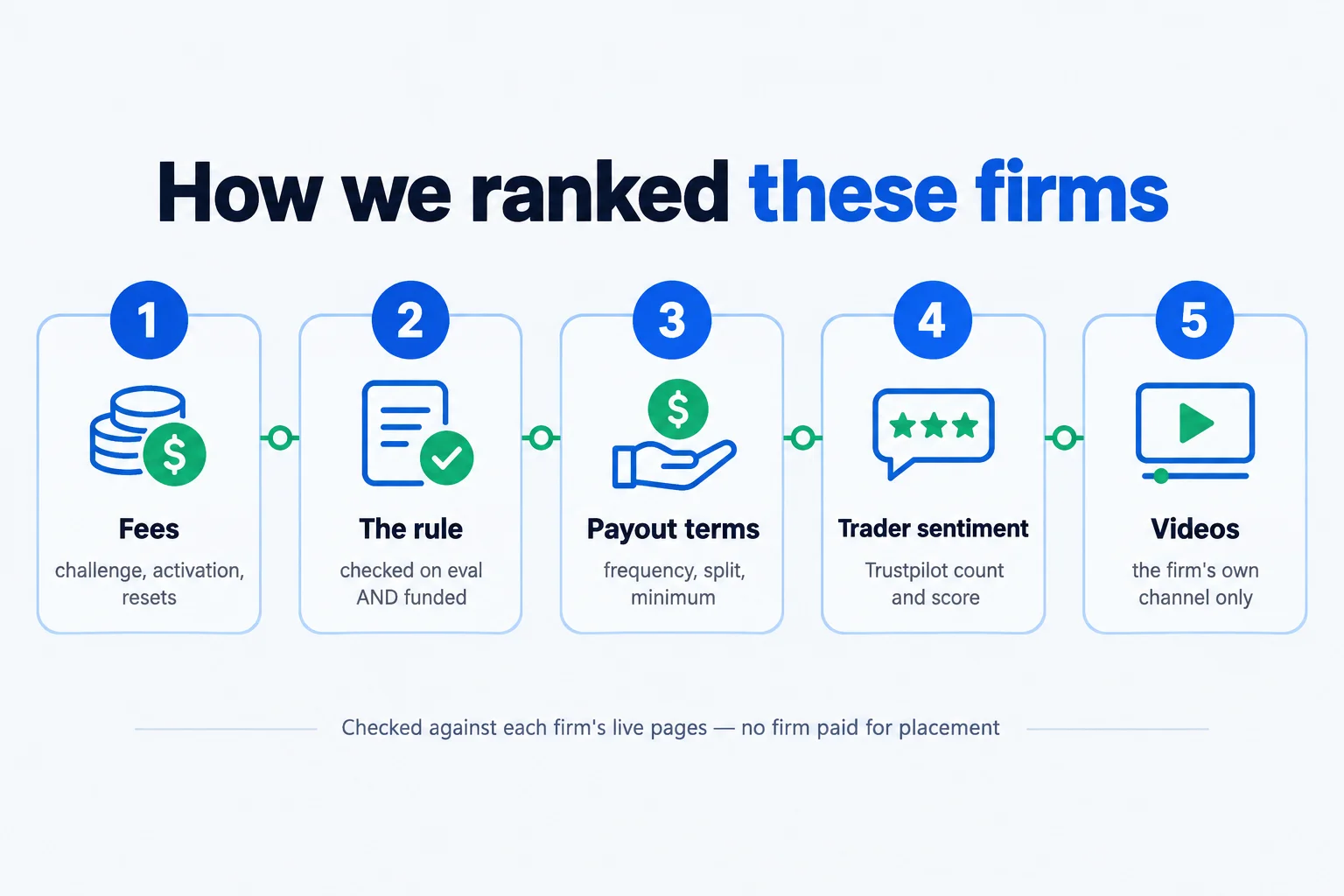
Each confirms TradingView at every stage up to the first payout. The first four have no live call-up at all; the last five do have one, and we rank them anyway, call-up named first in their watch-out, in order of fewest stage/SKU gaps, then 50K list price, then Trustpilot.
FTMO uses TradingView through OANDA on its 2-Step, best for forex traders
Verdict: First. Your own TradingView account trades the Challenge, Verification and FTMO Account through the OANDA panel with your FTMO login, and there is no live stage.
Video: “How to Log In to TradingView on Web or Desktop App | FTMO US,” FTMO official YouTube channel, 2026-04-30. Source type: vendor-produced. Why selected: FTMO’s own TradingView login walkthrough. It was made for FTMO US, but the global 2-Step uses the same OANDA panel and FTMO profile login.
On August 26, 2026 FTMO “officially added TradingView as a platform option for your FTMO Challenge, Verification, and FTMO Account. This integration allows you to execute trades directly from the TradingView interface.” FTMO US sells a 2-Step for $399 on MT5 or TradingView only. FTMO Futures ($119 a month) is unranked: its terms are silent on TradingView after a live move.
- Stages: Challenge, Verification and FTMO Account: TradingView login. No live stage; the simulated FTMO Account pays.
- Login: OANDA inside TradingView, with your FTMO Client Area profile. “You can use any of your TradingView registrations.”
- Cost: €345 one-time at $50K, refundable with the first reward. FTMO says it charges no “additional or hidden fees”. Whether the free TradingView plan is enough is not published.
- At $50K: First Reward claim opens on day 14 after your first trade or any day after, $20 minimum by bank wire ($50 crypto), and you keep 80% of profit (up to 90% on the Scaling Plan or Premium Programme). The $5,000 static floor ends the account if it is ever breached, whatever day that happens on.
- Choose it when: You chart in TradingView and trade forex or CFDs.
- Watch out for: The link is per device: accounts “will not be synced to any of your other devices”. One reviewer reports some symbols are not tradable there (not firm-confirmed). Platform switches: before the first trade or after a reward.
- Trustpilot and records: 4.8/5 on 53,443 reviews. FTMO profile.
FXIFY uses TradingView through Alchemy Markets on Two Phase Classic
Verdict: Second. The Two Phase Classic trades from your TradingView account through Alchemy Markets at evaluation and funded, with no platform fee.
Video: “How to Trade Your FXIFY Account Inside TradingView,” FXIFY official YouTube channel, 2025-09-30. Source type: vendor-produced. Why selected: FXIFY’s own walkthrough of trading an FXIFY account inside TradingView (Alchemy Markets, Trading Panel, order ticket).
Pick TradingView at checkout; the funded account keeps the route. Its own pages disagree on Instant Funding: the Instant Funding platform FAQ omits TradingView while checkout and the platform-change FAQ include it, so we do not rank that product. Lightning is MT5 only.
- Stages: Evaluation and funded: TradingView login. No call-up.
- Login: Alchemy Markets in TradingView’s Trading Panel, with firm-issued credentials.
- Cost: $379 one-time at $50K list. TradingView carries no FXIFY fee.
- At $50K: First payout as soon as 4 trading days after you pass, $50 minimum, and you keep 80% on a 14-day cycle or 100% on a monthly cycle (your choice at checkout). The $5,000 static floor, not an intraday trail, ends the account.
- Choose it when: You want a static 10% ($5,000) floor and the same TradingView login after you pass.
- Watch out for: Latency-arbitrage exits: 11 dated reviews from January to September 2026 describe terminations after passing, and FXIFY replies it is “unable to disclose the internal detection methods”. The platform locks once you trade in a phase.
- Trustpilot and records: 4.3/5 on 6,334 reviews. FXIFY profile, FXIFY rules.
Purdia uses TradingView through Tradovate, the only ranked futures firm
Verdict: Third, and the only futures firm ranked. The 50K EOD Evaluation trades from TradingView through Tradovate, and the move to live is triggered by rules, not by a call-up you cannot refuse.
Video: no official Purdia video covers TradingView, and we do not substitute affiliate videos.
Checkout reads “Trade with Tradovate | TradingView”. Purdia’s knowledge base says the Tradovate TradingView add-on “should be available at no additional cost for Purdia traders”, and a free TradingView plan works. The path is rule-based: pass the Sim Funded Account (SFA), trade a Temp SFA with “a maximum transferable profit cap of $10,000”, then move to a live Tradovate account. If the broker declines you, you keep the eligible Temp SFA funds.
- Stages: Evaluation, SFA, Temp SFA and live: TradingView via Tradovate, but the funded and live stages rest on generic wording (“TradingView may be used with Purdia Capital accounts”), not a sentence that names each stage.
- Login: Tradovate inside TradingView, with credentials from Purdia Dashboard > Settings > Trading.
- Cost: $179 a month at 50K list, plus a $130 activation fee on passing. No TradingView fee published.
- At $50K: The Evaluation needs 5 trading days; the SFA needs 10 trading days with at least five $200-plus days before the $10,000 transferable-profit cap kicks in on the Temp SFA. You keep 90% of profit; SFA profit above the target is forfeited, not paid later.
- Choose it when: You trade futures from TradingView and want a live path without a discretionary call-up.
- Watch out for: SFA profit above the target is forfeited. Trustpilot is small: 88 reviews, with September 2026 reviews alleging payout delays.
- Trustpilot and records: 3.8/5 on 88 reviews. Purdia profile.
Darwinex Zero uses TradingView through Darwinex, a subscription not a challenge
Verdict: Fourth, and a different shape. Darwinex Zero is a $50 monthly subscription to a virtual account, not a challenge; you trade from TradingView through Darwinex at every stage.
Video: “TradingView + Darwinex Zero: Now Live,” Darwinex Zero official YouTube channel, 2026-07-16. Source type: vendor-produced. Why selected: Darwinex Zero’s own TradingView launch announcement, a short clip rather than a step-by-step guide.
There is no pass or fail and no drawdown limit; cash comes only as a 15% performance fee on notional allocations to the DARWIN built from your trading. “A free TradingView account is sufficient”, with a “lower price update frequency”.
- Stages: Calibration, allocation and investor stage: the same TradingView account. No call-up.
- Login: Darwinex inside TradingView, firm-issued username and password.
- Cost: $50 a month, or $40 a month billed yearly, or $35 a month on a 3-year plan. Not comparable with a one-time challenge fee.
- At $50K: There is no $50K account size and no pass gate: the virtual account trades $100K notional from day one. After roughly 15 trading days (25 risk-equivalent decisions), the DARWIN forms and a DarwinIA allocation can follow if its rating clears 75; cash pays quarterly as 15% of net profit above the high-water mark on whatever capital gets allocated, never a split of the virtual account’s own P&L.
- Choose it when: You trade forex, index or commodity CFDs and want a track record rather than a pass.
- Watch out for: TradingView covers forex, index and commodity CFDs only; futures, stocks and crypto are MT5-only. “Existing MT4 or MT5 accounts cannot be connected to TradingView.” Terms of Business clause 5.3 lets Zero void payouts for shared or commercial strategies.
- Trustpilot and records: 4.2/5 on 386 reviews. Darwinex Zero profile.
FundedNext Futures uses TradingView through Tradovate, with a call-up to Live
Verdict: Fifth. Flex 50K trades from TradingView through Tradovate at the Challenge and the FundedNext Account, where every reward is paid; no current Futures SKU loses TradingView.
Video: “How to Connect Your FundedNext Account to TradingView,” FundedNext Futures official YouTube channel, 2026-08-19. Source type: vendor-produced. Why selected: FundedNext’s own TradingView connection walkthrough, embedded on its futures help article.
Flex 50K lists at $133.99. Activate Tradovate’s TradingView Add-On first, then connect through the Trading Panel in Demo mode. FundedNext CFD is a different program: Match-Trader embeds TradingView-style charts, and US CFD clients get Match-Trader only.
- Stages: Challenge and FundedNext Account: TradingView login via Tradovate. Live TradingView access is not published.
- Login: Tradovate inside TradingView’s Trading Panel, Demo mode, with Dashboard credentials.
- Cost: $133.99 one-time at 50K list. No firm fee for TradingView; live professional data cost is not published.
- At $50K: Payouts run every 5 benchmark days per cycle, $250 minimum, at a 95% split, with 40% consistency enforced only on the Challenge, never on the funded account. A 15-Performance-Reward total then opens the live review pool.
- Choose it when: You want a one-time-fee futures challenge where no SKU loses TradingView.
- Watch out for: Call-up: traders who earn 15 Performance Rewards enter a live review pool; FundedNext’s risk team decides at its sole discretion, closes every Challenge/FundedNext Account, and (Legacy SKU) converts sim profit with no published decline option.
- Trustpilot and records: 4.5/5 on 80,482 reviews. FundedNext profile.
TradeDay uses TradingView through Tradovate on Fast Pass, with a call-up to Funded Live
Verdict: Sixth. Fast Pass trades from your own TradingView account through Tradovate at evaluation and Funded Sim, where the first four payouts are paid; only the Rithmic SKU loses TradingView.
Video: no official TradeDay video covers TradingView, and we do not substitute affiliate videos.
Fast Pass 50K lists at $189 a month. Pick “Tradovate Ninjatrader” at checkout: Rithmic buyers get no TradingView and cannot switch brokers. TradingView itself is free to connect with your own licence; Funded Live costs $156 a month per exchange for data there, and TradingView access is not published.
- Stages: Evaluation and Funded Sim: TradingView login via Tradovate. Funded Live TradingView access is not published.
- Login: Tradovate inside TradingView’s Trading Panel, with your TD_ username and password.
- Cost: $189 a month list at 50K, no activation fee. TradingView is free; Funded Live professional data runs $156 a month per exchange.
- At $50K: Payouts need 5 profitable days of $150 or more per cycle, $250 minimum, at an 80/20 split on Funded Sim rising to 90/10 once Funded Live opens. A 45% consistency rule applies to accounts opened on or after July 26, 2026.
- Choose it when: You already pay for TradingView and want an EOD-trailing Funded Sim account with no daily loss limit.
- Watch out for: Call-up: on your 5th payout request, or earlier at TradeDay’s discretion, Funded Sim closes and Funded Live opens at a $0 balance, with no decline option published; TradeDay calls it “the destination of the program”.
- Trustpilot and records: 4.6/5 on 1,440 reviews. TradeDay profile, TradeDay rules.
Apex Trader Funding uses TradingView on Tradovate accounts, with a call-up to live
Verdict: Seventh. The 50K EOD Trail trades from TradingView through Tradovate at evaluation and the sim Performance Account, where payouts are made; Rithmic and WealthCharts accounts get no TradingView.
Video: “EOD Drawdown,” Apex Trader Funding official YouTube channel, 2026-03-01. Source type: vendor-produced. Why selected: Apex’s own EOD Drawdown rules explainer; n