Key takeaways
Apex Trader Funding publishes an official payout list at https://apextraderfunding.com/payouts/ with masked trader names, countries, payout amounts, dates, and approved status, but that firm-published list is a trust signal, not an independent audit or a guarantee that every request will be approved.
Read the full summary
Apex Trader Funding publishes an official payout list at https://apextraderfunding.com/payouts/ with masked trader names, countries, payout amounts, dates, and approved status, but that firm-published list is a trust signal, not an independent audit or a guarantee that every request will be approved. Apex’s current EOD Performance Account help page, last checked by BestProps on June 2, 2026, lists up to weekly payouts, 100% of the approved payout amount paid to the trader, 5 qualifying trading days, a $500 minimum request, a 50% consistency rule, a safety net based on drawdown limit plus $100, and up to 6 payouts per account. Apex’s payout method page states that most users receive payouts within 5 to 11 business days total after request, with review, funds-sent, and bank or payment-provider stages inside that window. Legacy PA rules are different, with 8 trading days, 5 profit days of $50 or more, a 30% consistency rule, and separate maximum payout rules, so verify your exact account type before requesting.
Apex Trader Funding payout proof searches usually come from traders who are past the marketing pitch. They want to know whether Apex actually pays, what kind of proof exists, how long withdrawals take, and why a payout might be denied.
The short answer is that Apex does publish an official payout page, and its help center documents payout requirements, payout methods, timelines, and denial scenarios. That does not mean every positive screenshot or social post is reliable, and it does not mean a profitable account is automatically eligible. The safer way to evaluate Apex payout proof is to separate verified Apex sources from trader-reported claims.
This article focuses on Apex Trader Funding payout evidence, denials, and withdrawal timing as of June 2, 2026. Apex uses different rule sets for current EOD Performance Accounts and legacy Performance Accounts, so always confirm your account type inside the Apex dashboard and current help center before requesting a payout.
BestProps is not affiliated with Apex Trader Funding and does not provide financial advice. Prop firm evaluations and futures trading involve rules, subscription costs, payout conditions, and the risk of losing access to an account. Read Apex Trader Funding’s current terms, risk disclosure, and account rules before making any trading or purchasing decision.
Apex Trader Funding payout evidence verdict
Apex payout evidence is strongest when it comes from Apex’s own payout list or from a trader’s private dashboard and bank record. Apex’s public Payouts page lists masked names, countries, payout amounts, dates, and approved status. On June 2, 2026, the page showed many approved payouts dated that same day, including entries from the United States, Brazil, Italy, Singapore, Germany, Australia, and other countries.

That page is useful, but it is not the same thing as a full audit. The names are masked, individual account histories are not shown, and the list does not tell you how many requests were denied. It does show that Apex maintains a public payout ledger and that the amounts vary widely by trader and account.
Reddit posts, YouTube videos, Discord screenshots, certificates, and Trustpilot reviews can add context, but they should not be treated as primary proof of Apex rules or payout policy. A screenshot can be old, cropped, staged, or tied to a legacy account. For policy details, use Apex’s official help center and dashboard.
What this article does not verify
This article does not independently audit Apex’s total payout volume, payout denial rate, unpublished disputes, private settlements, individual trader outcomes, or payment records outside Apex’s public pages. Apex’s payout list is firm-published data. It is useful evidence that Apex displays approved payouts, but it is not third-party verification.
Use this article as a rule-reading and risk-checking guide. Before you request a payout, verify the current version of each relevant Apex page yourself: the public payout list, EOD payout rules, payout method information, how-to-request instructions, and legacy payout parameters if your account is legacy.
What counts as Apex Trader Funding payout evidence
Use this hierarchy when evaluating payout claims:
| Proof type | What it can show | What it cannot prove |
|---|---|---|
| Apex public payout page | Apex has listed approved payouts by date, amount, location, and masked trader name | Whether a specific social-media user received a payout |
| Apex dashboard payout history | Whether your own request was submitted, approved, paid, or denied | Whether another trader’s payout claim is real |
| Bank, ACH, or Plane deposit record | Whether funds reached a trader’s payment account | Whether the payout complied with every rule |
| Trader screenshots or certificates | Possible supporting context | Current Apex policy, denial rates, or guaranteed eligibility |
| Forums and reviews | Common concerns and complaint patterns | Verified rules, fees, payout timing, or legal conclusions |
The practical takeaway is simple: use Apex’s public list to confirm that Apex publishes approved payouts, but use your own dashboard and payment records to prove your own payout. Do not rely on a third-party screenshot to decide whether your account is eligible.

Apex payout rules by account type
Apex’s current help center separates rules by account type. The two most important groups for this topic are EOD Performance Accounts and legacy Performance Accounts.
Apex EOD Performance Account payout rules
Apex’s EOD Payouts article says approved payouts are issued at a 100% payout split. The same page says EOD Performance Accounts can receive up to weekly payouts, require at least 5 qualifying trading days, have a $500 minimum payout request, apply a 50% consistency rule, and are limited to 6 payouts per Performance Account.
Last checked by BestProps: June 2, 2026. Apex can change account rules, so use the official EOD page and your dashboard as the source of truth before requesting.
For EOD Performance Accounts, the official payout requirement table currently lists:
| EOD account size | Min trade days | Min daily profit per qualifying day | Safety net | Min balance to request | Max payouts |
|---|---|---|---|---|---|
| 25K | 5 | $100 | $26,100 | $26,600 | 6 |
| 50K | 5 | $250 | $52,100 | $52,600 | 6 |
| 100K | 5 | $300 | $103,100 | $103,600 | 6 |
| 150K | 5 | $350 | $154,100 | $154,600 | 6 |
A qualifying day does not have to be consecutive. It must meet the minimum daily profit for that account size. Apex says the earliest EOD payout request can happen after 5 qualifying days, but there is no deadline to complete those days.
The 50% consistency rule is also important. Apex says no single profitable trading day may account for 50% or more of total profit earned since the last approved payout. If the account does not meet that requirement, the request option will not appear until the account reaches the required consistency.
Apex legacy Performance Account payout rules
Legacy Performance Accounts use a different payout structure. Apex’s Legacy PA Payout Parameters article says legacy accounts require at least 8 trading days, with at least 5 of those days showing profit of $50 or more. The page also says the safety net applies to the first 3 payouts, and that legacy accounts use a 30% consistency rule.
Last checked by BestProps: June 2, 2026. These legacy figures should not be applied to an EOD account unless Apex’s dashboard or help center says they apply to that account.
Legacy minimum required balances currently listed by Apex include:
| Legacy account size | Minimum required balance |
|---|---|
| $25K | $26,600 |
| $50K | $52,600 |
| $100K | $103,100 |
| $150K | $155,100 |
| $250K | $256,600 |
| $300K | $307,600 |
| $100K Static | $102,600 |
The same Apex page says legacy traders are entitled to 100% of the first $25,000 per account they are paid out, then 90% after that. It also lists a $500 minimum payout and maximum payout amounts for the first five payouts, with no maximum starting from the sixth payout if the required minimum balance remains in the account after withdrawal.
This is where many search results get confusing. An older article or trader post may mention a 30% consistency rule, while Apex’s EOD page currently references a 50% consistency rule. Both can be true for different account groups. Verify the account type before applying any payout advice.
Apex withdrawal timeline
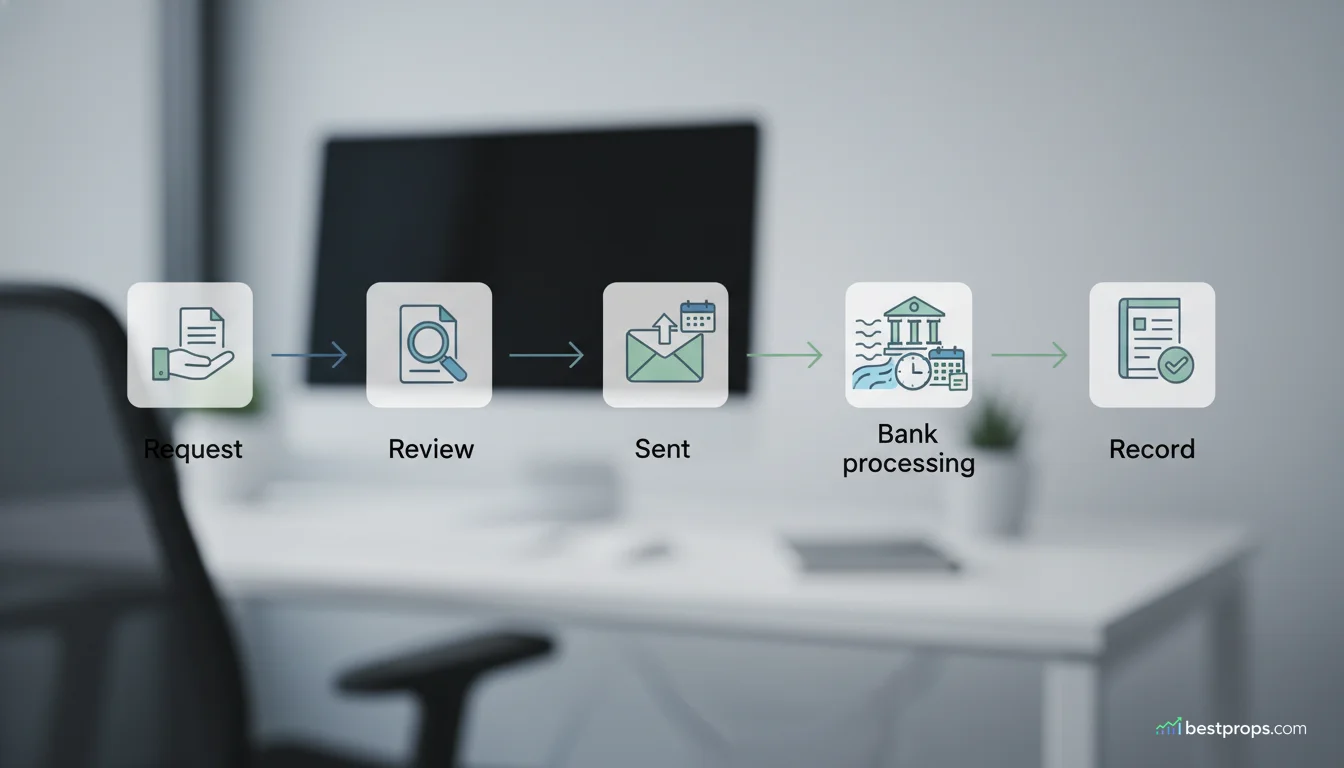
Apex’s Payout Method Information page gives the clearest timeline for what happens after a request is submitted. Apex states that most users receive payouts within 5 to 11 business days total, but timing can vary by approval status, payment method, bank, provider, forms, and local processing.
| Step | Official timing |
|---|---|
| Apex review | Within 2 business days |
| Funds sent after approval | 3 to 4 business days |
| Bank or payment provider processing | Usually 3 to 7 business days |
| Typical total window | Most users receive payouts within 5 to 11 business days |
For payment method, Apex says U.S. users receive payouts through ACH direct deposit to a U.S. bank account. International users receive payouts through Plane, and the timing can depend on the local bank. Apex also says international users receive a Plane invitation after their first payout is approved.
If the dashboard shows paid but the funds have not arrived, Apex says users should allow up to 7 more business days before contacting their bank or Plane. That does not mean every payout takes that long. It means the standard processing window may extend beyond the dashboard status.
How to request an Apex payout
Apex’s How to Request a Payout guide says traders should first make sure payout details and personal details are current, then request from the correct Performance Account.
The request flow is:
- Open Account Details in the Apex dashboard.
- Go to the Payout tab.
- Select the correct Performance Account.
- Confirm the dashboard shows eligibility.
- Enter the request amount.
- Agree to the payout request agreement.
- Submit the request.
- Check status in the Payout History section.
Apex says eligibility criteria appear on the Account Details page. If the request button is missing, the account is usually not eligible, is not the correct account type, or is inside a restricted payout period.
Why Apex payout requests get denied
An Apex payout denial does not always mean the firm is refusing to pay a valid request. The official help center describes several situations where a request can be unavailable or denied.
| Denial or block reason | What Apex source supports it | What to check |
|---|---|---|
| Balance falls below the required minimum after request | Apex says the request will be denied automatically if the balance drops below the required threshold after submission | Safety net, minimum balance, pending request amount |
| Consistency requirement is not met | EOD help says the request option will not appear until 50% consistency is met | Largest profitable day compared with total profit since last approved payout |
| Not enough qualifying days | EOD rules require 5 qualifying days. Legacy rules require 8 trading days with 5 profit days of $50 or more | Account type and qualifying day count |
| Wrong account type or restricted period | Apex’s request guide says missing request button may mean the trader is not in the correct Performance Account or is in a restricted period | Dashboard account selection and payout tab |
| Prohibited activity or compliance review | Legacy rules list prohibited activities and say non-compliance can lead to payout denial, profit removal, or account closure | Trading conduct, account access, copy trading, risk management, and verification |
The most practical denial risk is trading after the request as if the money is still fully available. Apex says traders may continue trading immediately after submitting a payout request, but they should trade as though the requested funds have already been removed from the account. If the balance drops below the required threshold, the payout can be denied.
For legacy accounts, Apex also lists prohibited conduct such as trading without risk management, using the trailing threshold as a stop loss, manipulating the simulated trading setup, unauthorized users, account and resource sharing, and multiple account creation. The article says traders engaging in prohibited activities can forfeit accounts and balances, and Apex may audit accounts when it suspects non-compliance.
How to reduce Apex payout denial risk
Before requesting a payout, use this checklist:
- Confirm whether the account is EOD, legacy, static, or another account type.
- Check the Apex dashboard for eligibility instead of relying on a third-party post.
- Verify the payout method and personal information before submitting.
- Recalculate the qualifying trading day requirement.
- Check the consistency rule that applies to your account type.
- Leave room above the safety net or minimum balance after the requested payout.
- Avoid changing risk behavior after submitting a request.
- Do not share accounts, devices, credentials, or payment resources with other traders.
- Keep records of account status, request time, approval status, and payment status.
The key is to think about payout eligibility before the request, not after. A request submitted at the edge of the minimum balance can fail if one post-request trade moves the account below the threshold.
Apex payout evidence red flags
Search results around payout proof often include screenshots, certificates, and trader stories. Some may be legitimate, but the format creates risk for readers.
Watch for these red flags:
- A screenshot with no date or account type.
- A claim that ignores the difference between EOD and legacy rules.
- A post that promises guaranteed approval after a certain balance.
- A payout certificate presented as proof of current rules.
- A complaint that treats one denied request as proof that all requests are denied.
- Advice that says to trade aggressively immediately after submitting a request.
- Any claim about denials, bans, or withheld funds that does not distinguish user report from official policy.
For complaint-heavy topics, it is fair to say traders report frustration with denied payouts, review delays, or verification. It is not fair to present every allegation as fact. The verified policy point is narrower: Apex documents eligibility requirements, consistency rules, minimum balances, prohibited activities, and processing windows, and a request can fail when those requirements are not met.
Apex payout evidence versus alternatives
Apex is not the only futures prop firm with payout rules that require careful reading. When comparing Apex to alternatives, focus on rule mechanics instead of slogans.
| Comparison point | Apex question to ask | Why it matters |
|---|---|---|
| Payout proof | Does the firm publish payout records or only testimonials? | Public ledgers are useful, but they are still not full audits |
| First payout | How many qualifying days are required? | Timing depends on more than account profit |
| Consistency | Which percentage applies to your account type? | EOD and legacy rules can differ |
| Safety net | How much balance must remain after withdrawal? | A request can be denied if the balance falls below threshold |
| Payment rails | ACH, Plane, Wise, Deel, wire, or another provider? | Funding arrival depends partly on payment provider and bank |
| Denial policy | What conduct can lead to denial or account closure? | Rule compliance matters after reaching the payout amount |
BestProps has broader educational guides on drawdown rules explained, static drawdown versus trailing drawdown, and futures prop firms if you want to compare mechanics beyond Apex.
Does Apex Trader Funding actually pay traders?
Apex publishes an official payout page showing approved payouts by date, masked name, country, amount, and status. That supports the claim that Apex pays approved payouts, but it does not guarantee that every trader request will be approved. Eligibility still depends on account type, balance, qualifying days, consistency rules, payment setup, and compliance.
What is the Apex Trader Funding payout timeline?
Apex says it reviews payout requests within 2 business days, sends approved funds within 3 to 4 business days, and bank or payment provider processing usually takes 3 to 7 business days. Apex describes the typical total window as 5 to 11 business days.
Why was my Apex payout denied?
Officially documented denial or block reasons include falling below the required minimum balance after request, not meeting consistency rules, not having enough qualifying trading days, requesting from the wrong account type, being in a restricted period, or triggering compliance concerns tied to prohibited conduct.
What is the Apex 50% consistency rule?
For EOD Performance Accounts, Apex says no single profitable trading day may account for 50% or more of total profit earned since the last approved payout. If one day is too large relative to total profit, the request option will not appear until the account reaches the required consistency.
What is the Apex 30% consistency rule?
For legacy Performance Accounts, Apex says the 30% consistency rule means no single trading day should account for more than 30% of the total profit balance at payout request time. Apex says the rule applies until the sixth payout or until transfer to a Live Prop Trading Account.
Can I keep trading after requesting an Apex payout?
Yes. Apex says traders may continue trading immediately after submitting a payout request. However, Apex also says traders should act as if the requested funds have already been removed from the balance. If the account falls below the required minimum after submission, the payout can be denied.
Is Apex payout proof from Reddit reliable?
Reddit posts can help you understand trader concerns and common questions, but they are not primary sources for Apex policy. Use Apex’s public payout list, help center, dashboard, and your own payment records for verified payout information.
Conclusion
Apex Trader Funding payout evidence is not a single screenshot or forum post. The best evidence is a combination of Apex’s official payout list, your dashboard eligibility status, and actual payment records after approval. The public payout page is a useful trust signal, but the help center rules explain why some requests are blocked or denied.
If you are preparing an Apex payout request, start with your account type. EOD Performance Accounts, legacy Performance Accounts, and static accounts can use different requirements. Confirm the qualifying days, consistency rule, minimum balance, safety net, payout method, and post-request trading buffer before submitting. That is the cleanest way to separate real payout proof from payout-risk noise.